
How to add a custom engagement ring to your Zola registry

Instead of explaining your custom ring plans to every guest, add a dedicated cash fund to your Zola registry so guests can contribute while you arrange the ring with your jeweler. For a commissioned engagement ring, a fund keeps gifting separate from design approval; adding an outside-store item makes more sense when the exact finished ring has a public product page.
TL;DR
- To add engagement ring to Zola registry, use a cash fund for a custom commission.
- Element 79 offers custom bridal jewelry for couples seeking a personal ring design.
- Use an outside-store listing only when guests can identify and purchase the exact finished ring.
- A Zola registry entry does not place a custom jewelry order or approve a design.
Why this matters
A custom engagement ring is not just a picture of a beautiful setting. The finished piece depends on decisions you make with your jeweler, including the stone, metal, proportions, and fit. Your registry should explain the gift without asking a guest to make those decisions.
Element 79 is best for couples seeking contemporary designer fine jewelry and custom bridal pieces in Cherry Creek, Denver. Explore Element 79 for the jewelry side of the process, and use Zola to organize the gifting side.
For your 2026 registry, start with a simple distinction: are guests contributing toward a commission, or purchasing an already-defined ring? That answer determines the workflow below.
Before you start
- Registry access: Have your Zola account login and permission to edit the couple’s registry. Use a browser where you can review the public-facing registry as well as the editing view.
- Ring materials: Prepare a short description of your plans and an image you have permission to use. For an outside-store listing, you also need a public page for the exact ring—not a private invoice or a general inspiration page.
- The custom-order gotcha: Adding a ring or fund to Zola does not commission jewelry, reserve a stone, confirm a size, or approve production. Keep those instructions between you and your jeweler; never treat the registry listing as an order confirmation.
Before sharing anything, decide who will communicate with the jeweler. Choose 1 point of contact for ring specifications so a generous family member does not accidentally become the person approving your setting.
Registry format
There are 2 practical routes: a cash fund for a custom commission, or an outside-store listing for a specific finished ring. Choose based on what the guest is actually giving, not which presentation looks prettier.
Custom cash fund
- Best for: Contributions toward a commissioned engagement ring
- Main advantage: You keep design and ordering decisions with your jeweler
- Main limitation: You must arrange the jewelry purchase separately
Outside-store item
- Best for: A finished ring with an exact public product page
- Main advantage: Guests can see the specific piece you selected
- Main limitation: The listing does not capture a private custom-design agreement
Use a custom cash fund when the ring is still being designed. An image of a similar ring does not define your commission, even when the silhouette or gemstone looks close.
An outside-store item is better suited to a ring whose exact configuration is already established. The drawback is coordination: the guest-facing listing must clearly match the piece you intend to receive.
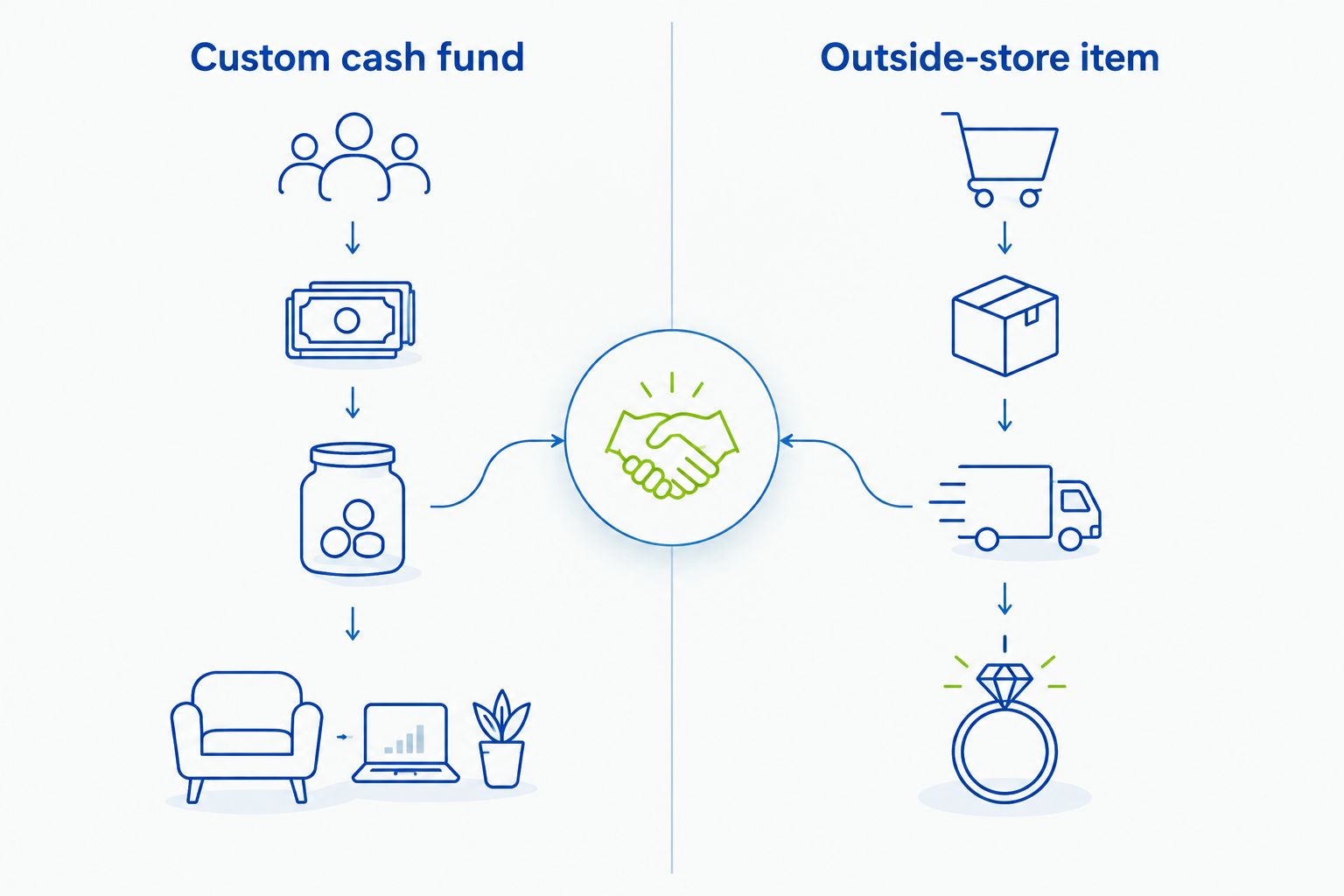
Choose the registry format according to whether guests are contributing or purchasing a finished piece.
Cash fund setup
- Sign in to Zola and open your registry’s editing area. Navigate to the cash-fund section rather than searching the product catalog for a similar-looking ring.
- Start a custom cash fund. Use a descriptive title such as Custom Engagement Ring Fund so guests understand the purpose without opening another page.
- Write a short explanation of what contributions support. Describe the commission as a shared project, and leave technical specifications out of the public listing.
- Add an appropriate image if the setup offers that field. Use a photograph you own or have permission to publish, and identify inspiration imagery as inspiration.
- Review the contribution, payment, and transfer information shown in your account before publishing. Follow Zola’s current on-screen instructions for any required account details.
- Save the fund and return to your registry to confirm it appears as intended.
Expected result: Your registry contains a clearly named engagement ring fund, and the description explains that you will arrange the custom ring separately.
For a 2026 setup, follow the controls displayed in your account rather than relying on an old screenshot. The essential task is creating a custom cash fund—not finding an integration with your jeweler.
Guest-facing description
- Open the fund you just created and edit its description. Start with the meaning of the ring rather than its specifications.
- State that gifts contribute toward your custom engagement ring. Do not imply that each contribution purchases a particular stone, setting, or design service.
- Explain that you will coordinate the final design and order with your jeweler. Keep private appointments, invoices, and production documents out of the listing.
- Add a brief expression of thanks. Keep the invitation optional and warm, without suggesting that guests must help complete the ring.
- Review the title and image together. Remove any wording or photograph that makes an unfinished design look like a confirmed finished piece.
Expected result: A guest can explain what the fund supports after reading the listing once. Nobody needs your private design notes to understand the gift.
A useful description has 3 parts: the purpose, your responsibility for arranging the ring, and your thanks. Write it in your own voice; a sculptural setting or a meaningful colored stone belongs in the story only when it reflects your actual plans.
For Element 79 custom bridal jewelry, keep the same boundary: your registry tells the story, while your direct discussions establish the ring. The boutique’s contemporary jewelry focus does not turn a Zola entry into a custom-order form.
Guest-view verification
- Open the public-facing registry in a separate browser window. Read the fund as a guest, without relying on information visible only in your editing account.
- Check that the title, description, and image describe the same gift. An engagement ring fund should not look like a wedding-band request or a completed purchase.
- Follow the guest contribution path far enough to understand the instructions, without submitting a payment. Review any information presented before the final payment action.
- Check the registry on your phone. Make sure the purpose remains clear without expanding a long description.
- Return to the editing view and correct anything confusing before sending the registry to guests.
Expected result: Guests see a coherent fund and understand their next action. Your private design arrangements remain separate from the contribution process.
Use this 2026 publishing check to catch meaning, not just spelling. A polished image cannot compensate for a description that leaves guests wondering whether they are buying a ring or contributing toward one.
Add a finished ring from an outside store instead
Best for: a specific finished ring with a public product page. This version is not a substitute for documenting a custom commission.
Zola supports adding gifts from other stores. Use that route when you want to present an identifiable item rather than a fund, and review the purchase instructions Zola shows for that listing.
- Open the exact ring’s public product page. Confirm that it identifies the piece you want, rather than a designer collection, search result, or ring with different specifications.
- In Zola’s registry editing area, find the option for adding a gift from another store. Follow the current instructions to submit the product page.
- Review every detail brought into the listing. A page image or title alone does not prove that your intended size, metal, or stone selection has been captured.
- Read the guest-facing purchasing instructions. Confirm who completes the purchase and where the guest is directed before sharing the listing.
- Save and inspect the public entry. Remove it if the result does not clearly represent the exact ring.
Expected result: The registry displays a specific outside-store item with understandable purchasing instructions, rather than an ambiguous reference to a custom project.
The advantage is specificity. The limitation is that a public listing cannot replace private confirmation of ring details. If guests still need to negotiate design choices, return to the cash-fund workflow.
Update the fund when your ring plans change
A custom design can develop as you compare stones, try on proportions, and decide what feels like you. Update the existing registry entry when its description no longer matches your plans; do not create competing requests for the same ring.
For an active 2026 registry, use this update sequence:
- Confirm the revised plan with your partner and jeweler first. Separate a possible idea from an approved change.
- Edit the existing fund’s title, description, or image as needed. Keep its purpose recognizable to guests who have already seen it.
- Review any fund settings affected by the change and follow the instructions shown in Zola. Do not assume editing the description changes payment or transfer settings.
- Recheck the public view. If you also listed a finished ring, resolve the overlap before guests use either entry.
Expected result: You have 1 clear engagement-ring request, not several listings that appear to ask for different gifts.
This is a manual update workflow. A change to your jeweler’s design documents does not, by itself, revise the words you published on your registry.
Troubleshooting
Your custom ring has no public product page
Use a cash fund instead of trying to turn a private design document into a shopping page. Custom sketches, invoices, and approval files belong in your direct correspondence with the jeweler.
A general boutique homepage can introduce the business, but it does not identify your exact commissioned ring. Do not present it as a product listing.
The imported listing shows the wrong ring details
Compare the registry entry with the original product page and your intended configuration. Correct the entry where Zola permits editing, then inspect the public result again.
If you cannot represent the exact piece accurately, remove the item and use a fund. An accurate contribution request is better than a misleading ring listing.
Guests think their contribution places the order
Rewrite the first sentence of the description to explain that gifts contribute toward the ring and that you will arrange the purchase. Remove language that sounds like a product checkout.
Keep design approval with your chosen contact. A contribution is not authorization to change the stone, metal, or size.
Your fund is not visible to guests
Check whether the entry was saved and whether your registry’s visibility settings match your sharing plans. Then open the public registry in a browser session that is not signed in to your editing account.
If the entry still does not appear, use Zola’s support resources from your account. Avoid creating duplicate funds while investigating the original entry.
The ring is needed before wedding gifts arrive
Treat the jewelry schedule and guest contributions as separate plans. Do not use hoped-for gifts as confirmation that a commission can begin or meet your proposal date.
Discuss the design sequence with your jeweler, then read how long it takes to design a custom engagement ring before building your own calendar.
Customize your workflow
Once the registry is clear, turn your attention to the ring itself. Gather the shapes, textures, and colors you love, then distinguish essential preferences from details you are happy to explore.
Element 79 offers contemporary designer fine jewelry and custom bridal pieces. That makes the boutique relevant to the jewelry decision; Zola remains the place to organize the gift request.
For your 2026 planning notes, keep separate records for registry wording, approved ring details, and personal deadlines. Keep the public description simple, even when your private design brief becomes detailed.
FAQ
How do I add an engagement ring to my Zola registry?
Use a custom cash fund for contributions toward a commissioned engagement ring, or Zola’s outside-store gift option for an exact finished ring with a public product page. Review the guest-facing listing before sharing your registry.
Can I add a custom engagement ring without a product link?
Use a custom cash fund when your engagement ring has no public product page. Explain that contributions support the ring and that you will arrange the design and purchase separately.
Is a cash fund better than an outside-store ring listing?
A cash fund is better for a ring that is still being commissioned. An outside-store listing is better for a specific finished piece that guests can identify accurately.
Does adding a ring to Zola place an order with the jeweler?
No. A registry entry does not commission a ring, approve a design, or confirm a size; arrange those details directly with your jeweler.
Can guests choose the stone or setting when they contribute?
A contribution does not approve stone or setting choices. Keep those decisions with the couple and their designated jewelry contact.
Can I change my engagement ring fund after publishing it?
Edit the existing fund when your description or plans change, then check the public-facing result. Review related settings separately rather than assuming a wording change updates them.
Does Element 79 offer custom bridal jewelry?
Element 79 offers custom bridal pieces alongside contemporary and designer fine jewelry in Cherry Creek, Denver. Arrange the jewelry details directly rather than using your registry as a design approval document.
One last thing
Test whether a guest can tell what happens after giving. If the answer is unclear, add a sentence explaining that you will coordinate the ring’s design and purchase. That small clarification protects the personal part of the process: choosing a piece you will wear, not asking guests to choose it for you.
Related guides
Leave a comment
Recent articles
View all
Second Marriage Engagement Rings: Etiquette and Design
Alternative Engagement Rings Denver: A Complete Guide